# Cluster HA - Loghorn - Cilium - KubeVip
#### Architecture
| ##### **Hostname**
| ##### **RAM**
| ##### **CPU**
| ##### **DISQUE**
| ##### **IP**
| ##### **FONCTION**
|
| k8s-master-1
| 4 go | 2 | 60 SSD | 192.168.1.101 | etcd + control-plane |
| k8s-master-2 | 4 go | 2 | 60 SSD | 192.168.1.102 | etcd + control-plane |
| k8s-master-3 | 4 go | 2 | 60 SSD | 192.168.1.103 | etcd + control-plane |
| k8s-worker-1 | 16 go | 4 | 60 SSD + 100 Go HDD (/opt) | 192.168.1.104 |
|
| k8s-worker-2 | 16 go | 4 | 60 SSD + 100 Go HDD (/opt) | 192.168.1.105 |
|
| k8s-worker-3 | 16 go | 4 | 60 SSD + 100 Go HDD (/opt) | 192.168.1.106 | |
| VIP CLUSTER | 192.168.1.100 |
|
|
| |
| VIP WORKERS | 192.168.1.99 |
|
|
| |
Tous les noeuds sont sur debian 13.
#### Résumé :
Type de cluster : **Haute Disponibilité**
Stockage : **Loghorn**
Réseau : **Cilium**
Exposition des workers : **KubeVip**
#### Préparation du systèm
CF : [https://docs.nehemiebarkia.fr/books/kubernetes/page/initialisation-de-mon-tout-premier-cluster-ha](https://docs.nehemiebarkia.fr/books/kubernetes/page/initialisation-de-mon-tout-premier-cluster-ha)
#### Installation des prérequits
CF : [https://docs.nehemiebarkia.fr/books/kubernetes/page/initialisation-de-mon-tout-premier-cluster-ha](https://docs.nehemiebarkia.fr/books/kubernetes/page/initialisation-de-mon-tout-premier-cluster-ha)
#### Préparation du cluster HA (KubeVip)
CF : [https://docs.nehemiebarkia.fr/books/kubernetes/page/initialisation-de-mon-tout-premier-cluster-ha](https://docs.nehemiebarkia.fr/books/kubernetes/page/initialisation-de-mon-tout-premier-cluster-ha)
#### Initialisation du cluster
CF : [https://docs.nehemiebarkia.fr/books/kubernetes/page/initialisation-de-mon-tout-premier-cluster-ha](https://docs.nehemiebarkia.fr/books/kubernetes/page/initialisation-de-mon-tout-premier-cluster-ha)
#### Installation du réseau Cilium
Installation de cilium-cli :
```bash
CILIUM_CLI_VERSION=$(curl -s https://raw.githubusercontent.com/cilium/cilium-cli/main/stable.txt)
curl -L --fail --remote-name-all https://github.com/cilium/cilium-cli/releases/download/${CILIUM_CLI_VERSION}/cilium-linux-amd64.tar.gz
sudo tar xzvf cilium-linux-amd64.tar.gz -C /usr/local/bin
rm cilium-linux-amd64.tar.gz
```
Déploiement :
```
cilium install --set ipam.operator.clusterPoolIPv4PodCIDRList="10.10.0.0/16"
```
Attendre que le statut soit opérationnel :
```bash
cilium status --wait
```
Vérification de la conectivité :
```bash
cilium connectivity check
```
Suivi des pods :
```
watch kubectl get pods -n kube-system -l k8s-app=cilium
```
cilium upgrade --set l2announcements.enabled=true \\
\--set externalIPs.enabled=true \\
\--set kubeProxyReplacement=true
kubectl get pods -n kube-system | grep cili | grep -v opera | grep -v envoy | awk '{print $1}' | xargs kubectl delete po -n kube-system
#### Configuration du cluster
CF : [https://docs.nehemiebarkia.fr/books/kubernetes/page/initialisation-de-mon-tout-premier-cluster-ha](https://docs.nehemiebarkia.fr/books/kubernetes/page/initialisation-de-mon-tout-premier-cluster-ha)
#### Ajout des différents noeuds master au cluster
CF : [https://docs.nehemiebarkia.fr/books/kubernetes/page/initialisation-de-mon-tout-premier-cluster-ha](https://docs.nehemiebarkia.fr/books/kubernetes/page/initialisation-de-mon-tout-premier-cluster-ha)
#### Déployer Loghorn
CF : [https://docs.nehemiebarkia.fr/books/kubernetes/page/initialisation-de-mon-tout-premier-cluster-ha](https://docs.nehemiebarkia.fr/books/kubernetes/page/initialisation-de-mon-tout-premier-cluster-ha)
#### Ajout des lablels "workers" aux noeuds workers :
```bash
kubectl label node k8s-worker-1 node-role.kubernetes.io/worker="true"
kubectl label node k8s-worker-2 node-role.kubernetes.io/worker="true"
kubectl label node k8s-worker-3 node-role.kubernetes.io/worker="true"
```
#### Déployer une VIP pour les noeuds Workers
cat <<EOF | kubectl apply -f -
apiVersion: cilium.io/v2alpha1
kind: CiliumLoadBalancerIPPool
metadata:
name: worker-vip-pool
spec:
blocks:
\- start: "192.168.1.2"
stop: "192.168.1.9"
serviceSelector:
matchLabels:
expose: "true"
EOF
cat <<EOF | kubectl apply -f -
apiVersion: cilium.io/v2alpha1
kind: CiliumL2AnnouncementPolicy
metadata:
name: worker-l2-policy
namespace: kube-system
spec:
nodeSelector:
matchLabels:
node-role.kubernetes.io/worker: "true"
serviceSelector:
matchLabels:
expose: "true"
loadBalancerIPs: true
externalIPs: false
interfaces:
\- ens18
EOF
cat <<EOF | kubectl apply -f -
apiVersion: apps/v1
kind: Deployment
metadata:
name: hello-world
namespace: default
spec:
replicas: 2
selector:
matchLabels:
app: hello-world
template:
metadata:
labels:
app: hello-world
spec:
containers:
\- name: hello
image: hashicorp/http-echo:latest
args:
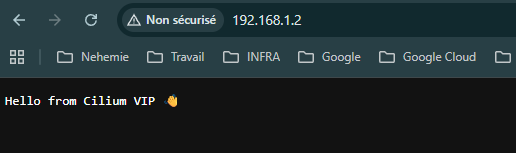
\- "-text=Hello from Cilium VIP 👋"
\- "-listen=:8080"
ports:
\- containerPort: 8080
\---
apiVersion: v1
kind: Service
metadata:
name: hello-world
namespace: default
labels:
expose: "true"
annotations:
lbipam.cilium.io/ips: "192.168.1.2" # IP fixe dans le pool
spec:
type: LoadBalancer
selector:
app: hello-world
ports:
\- port: 80
targetPort: 8080
EOF
[](https://docs.nehemiebarkia.fr/uploads/images/gallery/2026-04/8o5image.png)