Installer GitLab sur Debian
Prérequis :
sudo apt update
sudo apt install ca-certificates curl openssh-server postfix apache2
sudo a2enmod proxy;
sudo a2enmod rewrite;
sudo a2enmod proxy_http;
Ajout du dépôt pour installer GitLab :
cd /tmp
wget https://packages.gitlab.com/install/repositories/gitlab/gitlab-ce/script.deb.sh
bash script.deb.sh
Installation de GitLab :
apt install gitlab-ceModification de la configuration de GitLab :
nano /etc/gitlab/gitlab.rb# Modifier l'url selons vos besoins
external_url "https://gitlab.nehemiebarkia.fr"
# Disable nginx
nginx['enable'] = false
# Give apache user privileges to listen to gitLab
web_server['external_users'] = ['www-data']
#Configure push and pull on server repositories
gitlab_workhorse['enable'] = true
gitlab_workhorse['listen_network'] = "tcp"
gitlab_workhorse['listen_addr'] = "localhost:8181"Autorisation d'accès à gitlab_workhorse :
# Création du fichier de configuration
nano /etc/default/gitlab
gitlab_workhorse_options="-listenUmask 0 -listenNetwork tcp -listenAddr 127.0.0.1:8181 -authBackend http://127.0.0.1:8080"
Configuration d'apache :
nano /etc/apache2/sites-available/gitlab.conf# This configuration has been tested on GitLab 13.8
# Note this config assumes unicorn/puma is listening on default port 8080 and
# gitlab-workhorse is listening on port 8181.
# To make puma listen on port 8080 edit gitlab/config/puma.rb and add the following:
# Configuration moddifiée par Barkia Néhémie
#
# bind 'tcp://127.0.0.1:8080'
#
# To allow gitlab-workhorse to listen on port 8181, edit or create
# /etc/default/gitlab and change or add the following:
#
# gitlab_workhorse_options="-listenUmask 0 -listenNetwork tcp -listenAddr 127.0.0.1:8181 -authBackend http://127.0.0.1:8080"
#
#Module dependencies
# mod_rewrite
# mod_ssl
# mod_proxy
# mod_proxy_http
# mod_headers
# This section is only needed if you want to redirect http traffic to https.
# You can live without it but clients will have to type in https:// to reach gitlab.
<VirtualHost *:80>
ServerName gitlab.nehemiebarkia.fr
ServerSignature Off
RewriteEngine on
RewriteCond %{HTTPS} !=on
RewriteRule .* https://%{SERVER_NAME}%{REQUEST_URI} [NE,R,L]
</VirtualHost>
<VirtualHost *:443>
Include /etc/letsencrypt/options-ssl-apache.conf
SSLCertificateFile /etc/letsencrypt/live/gitlab.nehemiebarkia.fr-0001/fullchain.pem
SSLCertificateKeyFile /etc/letsencrypt/live/gitlab.nehemiebarkia.fr-0001/privkey.pem
ServerName gitlab.nehemiebarkia.fr
ServerSignature Off
ProxyPreserveHost On
# Ensure that encoded slashes are not decoded but left in their encoded state.
# http://doc.gitlab.com/ce/api/projects.html#get-single-project
AllowEncodedSlashes NoDecode
<Location />
# New authorization commands for apache 2.4 and up
# http://httpd.apache.org/docs/2.4/upgrading.html#access
Require all granted
#Allow forwarding to gitlab-workhorse
ProxyPassReverse http://127.0.0.1:8181
ProxyPassReverse http://gitlab.nehemiebarkia.fr/
</Location>
# Apache equivalent of nginx try files
# http://serverfault.com/questions/290784/what-is-apaches-equivalent-of-nginxs-try-files
# http://stackoverflow.com/questions/10954516/apache2-proxypass-for-rails-app-gitlab
RewriteEngine on
#Forward all requests to gitlab-workhorse except existing files like error documents
RewriteCond %{DOCUMENT_ROOT}/%{REQUEST_FILENAME} !-f [OR]
RewriteCond %{REQUEST_URI} ^/uploads/.*
RewriteRule .* http://127.0.0.1:8181%{REQUEST_URI} [P,QSA,NE]
RequestHeader set X_FORWARDED_PROTO 'https'
RequestHeader set X-Forwarded-Ssl on
# needed for downloading attachments
DocumentRoot /opt/gitlab/embedded/service/gitlab-rails/public
#Set up apache error documents, if back end goes down (i.e. 503 error) then a maintenance/deploy page is thrown up.
ErrorDocument 404 /404.html
ErrorDocument 422 /422.html
ErrorDocument 500 /500.html
ErrorDocument 502 /502.html
ErrorDocument 503 /503.html
# It is assumed that the log directory is in /var/log/httpd.
# For Debian distributions you might want to change this to
# /var/log/apache2.
LogFormat "%{X-Forwarded-For}i %l %u %t \"%r\" %>s %b" common_forwarded
ErrorLog /var/log/httpd/logs/gitlab.nehemiebarkia.fr_error.log
CustomLog /var/log/httpd/logs/gitlab.nehemiebarkia.fr_forwarded.log common_forwarded
CustomLog /var/log/httpd/logs/gitlab.nehemiebarkia.fr_access.log combined env=!dontlog
CustomLog /var/log/httpd/logs/gitlab.nehemiebarkia.fr.log combined
</VirtualHost>
<Directory /opt/gitlab/embedded/service/gitlab-rails/public>
# required for icons
Options FollowSymLinks
Require ip 127.0.0.1
</Directory>
Vous devez disposer d'un certificat SSL
Générer un certificat avec le logiciel Certbot :
certbot certonly --standalone -d gitlab.nehemiebarkia.fr --staple-ocsp -m nehemiebarkia@gmail.com --agree-tos
Nous avons terminé de configurer GitLab ! il ne reste plus qu'à les appliquer :
gitlab-ctl reconfigure
Puis, nous activons notre configuration apache :
a2ensite gitlab
systemctl reload apache2
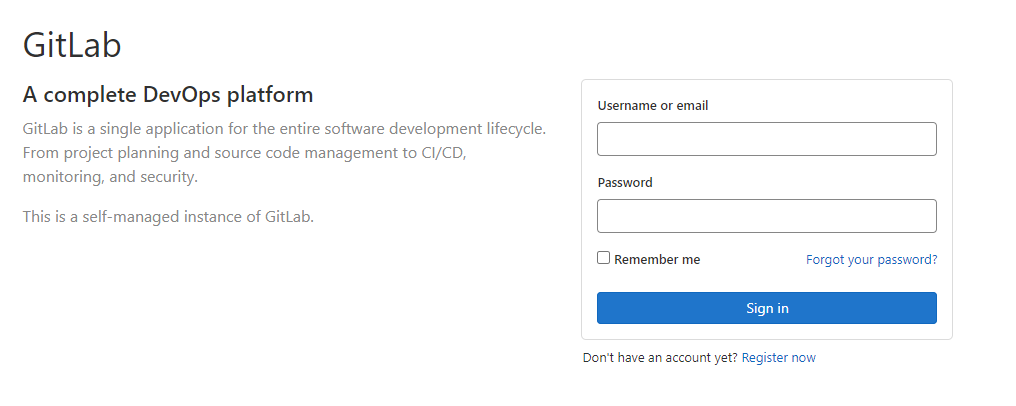
Nous pouvons maintenant nous rendre sur https://gitlab.nehemiebarkia.fr :